
Can you contact Amazon customer service? And if so, how do you contact Amazon for customer service? Those are very good questions, because in recent years Amazon seems to have made it more and more difficult to get through to their customer service representatives. But never fear, I’ll show you several methods for how to contact Amazon customer service in this step-by-step guide!
Whether you want to contact Amazon by chat, phone, email, or social media, this guide will help you easily contact Amazon’s customer service team to get the answers and help you need. Simply follow each step as it’s outlined below, and you’ll be in touch with Amazon customer support in no time!

Methods for Contacting Amazon Customer Service
When trying to contact Amazon customer care, you have a few different options to choose between:
- Live chat
- Phone
- Social media
As you’ll see as we examine the different methods, some are easier to use than others.
Amazon’s live chat feature is their preferred method of customer support, so it is one of the quickest ways to speak with a live customer service representative. However, it can be tricky to find where the chat option is if you don’t know how to find it. That’s why I’ve included a detailed step-by-step guide with pictures to help you out!
Phone is another popular Amazon help option, and below you’ll find the numbers you need to know to call Amazon and get support.
Email is the least useful option. There is an email address you can try if you are determined to use this method, but it is slow and unreliable so I highly recommend using one of the other options on this list if at all possible.
And social media is your fourth option if you’re looking for another convenient way to get in touch with customer service.
While chat and phone are generally the best options to contact Amazon, I’ve included all the contact options here so you can choose which method works best for you.
How to Contact Amazon Customer Service Chat by Website
Wondering how to get in touch with Amazon via live chat? Chat is often the quickest and easiest way to speak with a representative, though the steps to getting to the chat feature can be a bit of a pain. So here’s how to find Amazon customer service chat via Amazon’s website!
1. Go to the Amazon Customer Service Hub
Your first step is to go to the Amazon Customer Service Hub.
The easiest way to get there is to simply click this link that will take you directly there. Alternatively, you can find the hub by scrolling to the footer of Amazon.com and clicking the button that says “Help” under the heading “Let Us Help You.”
2. Click “Help With Something Else”
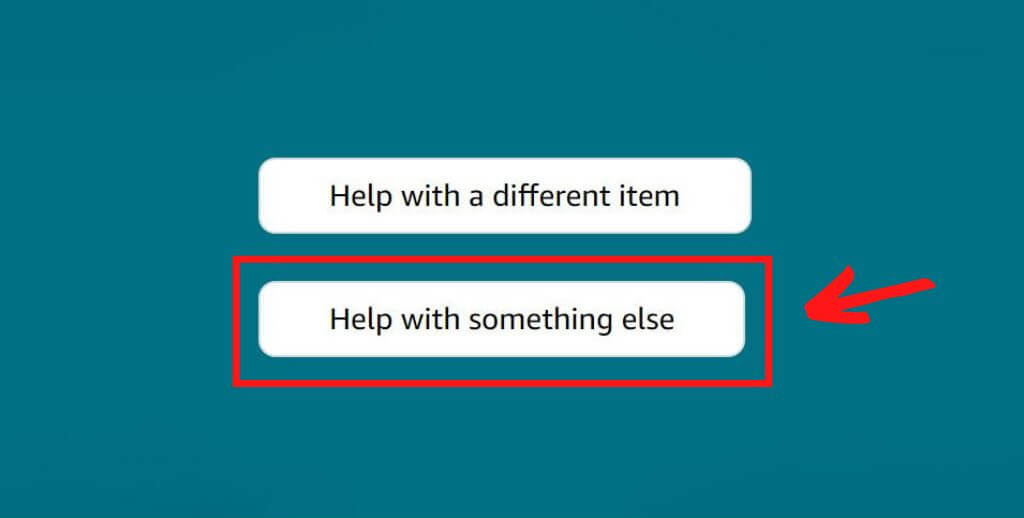
Once you’re on the Customer Service Hub page, you’ll likely first see a large box at the top that says “Do you need help with a recent item, [Your Name]?”
If you see the item you need help with listed in that top section of the page, then feel free to click on it and you’ll get the chance to tell Amazon what is wrong with the item or what you need help with.
If you don’t see what you’re looking for in that top box, or if you just want to get to an Amazon customer service representative as quickly as possible, then look for the buttons just below the top box and to the left. Then click the lower of the two buttons that reads “Help with something else.”
3. Click “Something Else”
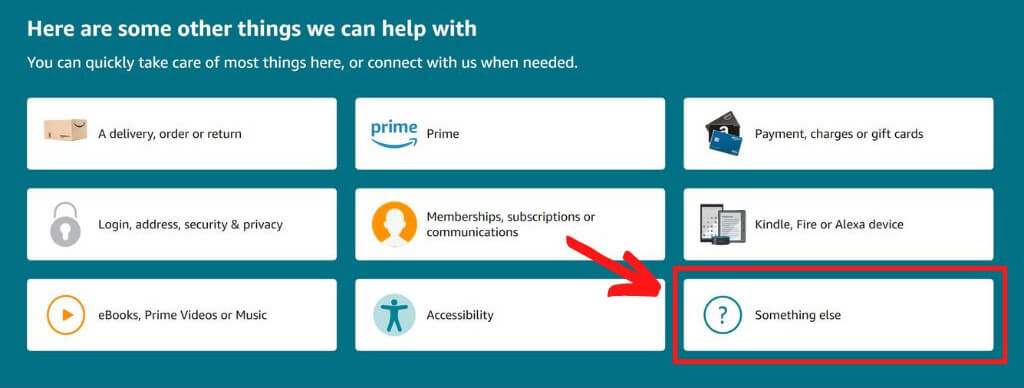
After you click “Help with something else,” a new set of options will open up.
At this point, you can read through the new options and see if any of them are what you are looking for (and if any of them are what you want, you can click them to continue down the path of customer service for that item).
The options in this section of the customer service hub include special sections for Kindle ebooks, memberships and subscriptions (like Kindle Unlimited and Audible), and e-readers like Kindle or Fire Tablets.
If you choose to click on one of these pre-set box options, a new page will open with more options related to whichever box you chose. Inside that new page, you’ll find links to relevant articles that will show you where and how you can take care of your issue by yourself (if you want to take the time to learn how to do it yourself when you’re having an issue).
If learning how to fix problems yourself is not your cup of tea, then the quickest way to get help and skip all the rigmarole is to skip all the other pre-set boxes and simply click the “Something else” button on the lower right side.
4. Click “I Need More Help”
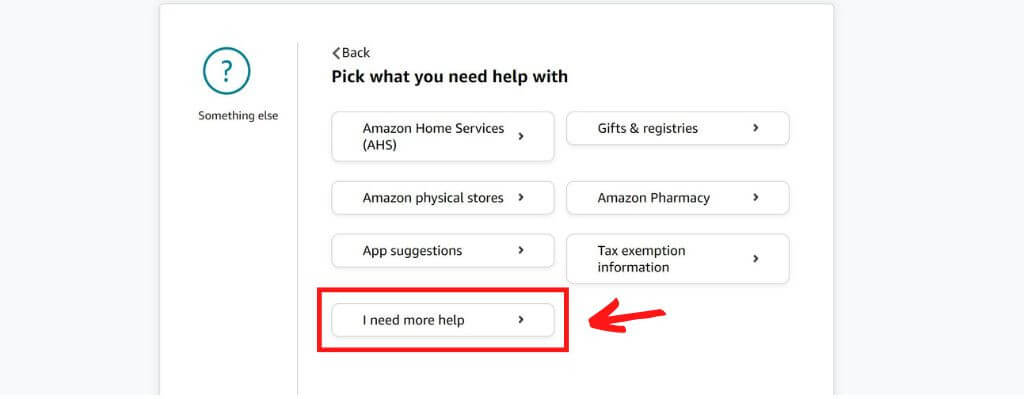
Next, you’ll be taken to a new page with more options for you to explore. Skip all the other options and go straight to click on the button that reads “I need more help”.
5. Click “No, Something Else”
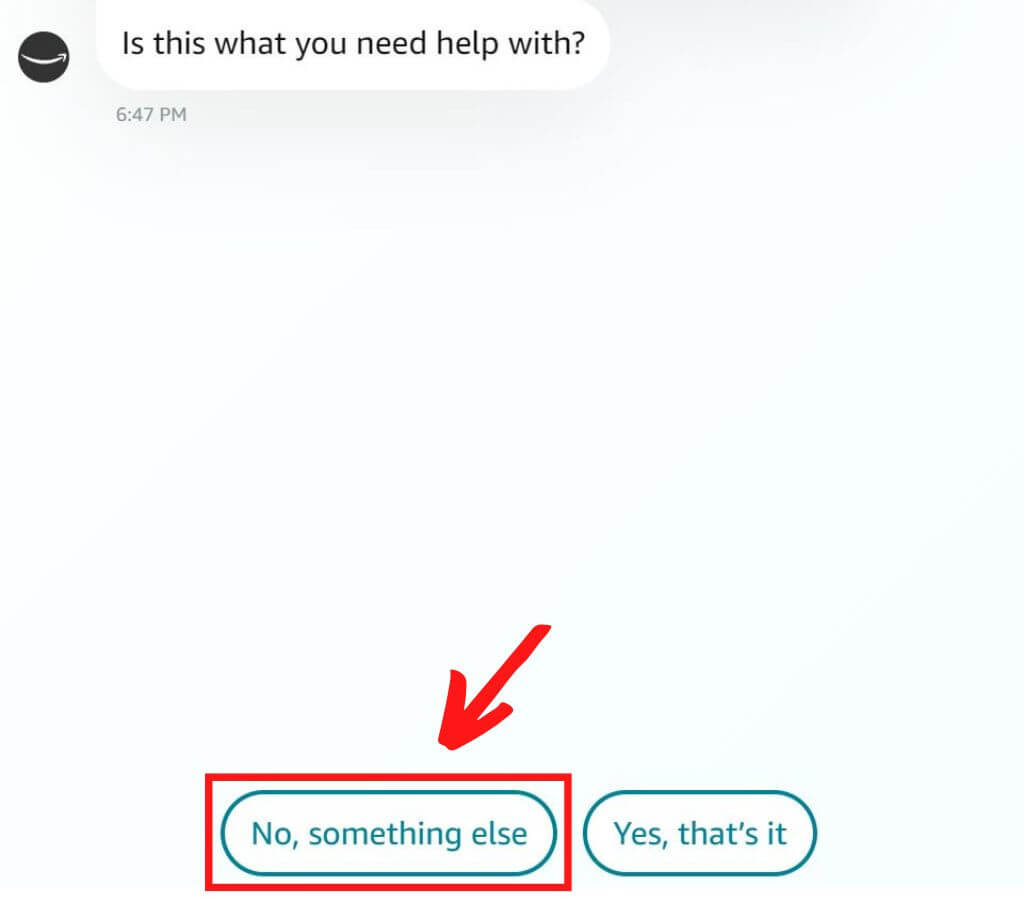
After the previous step, a new page will pop up in a new window and this is the first step of talking with Amazon chat. You will first have to talk with a bot before being redirected to an actual person.
To streamline the process of getting to talk with a real human, ignore what they say at the top of the screen and simply click the button at the bottom that reads “No, something else.”
6. Type “Talk With a Representative”
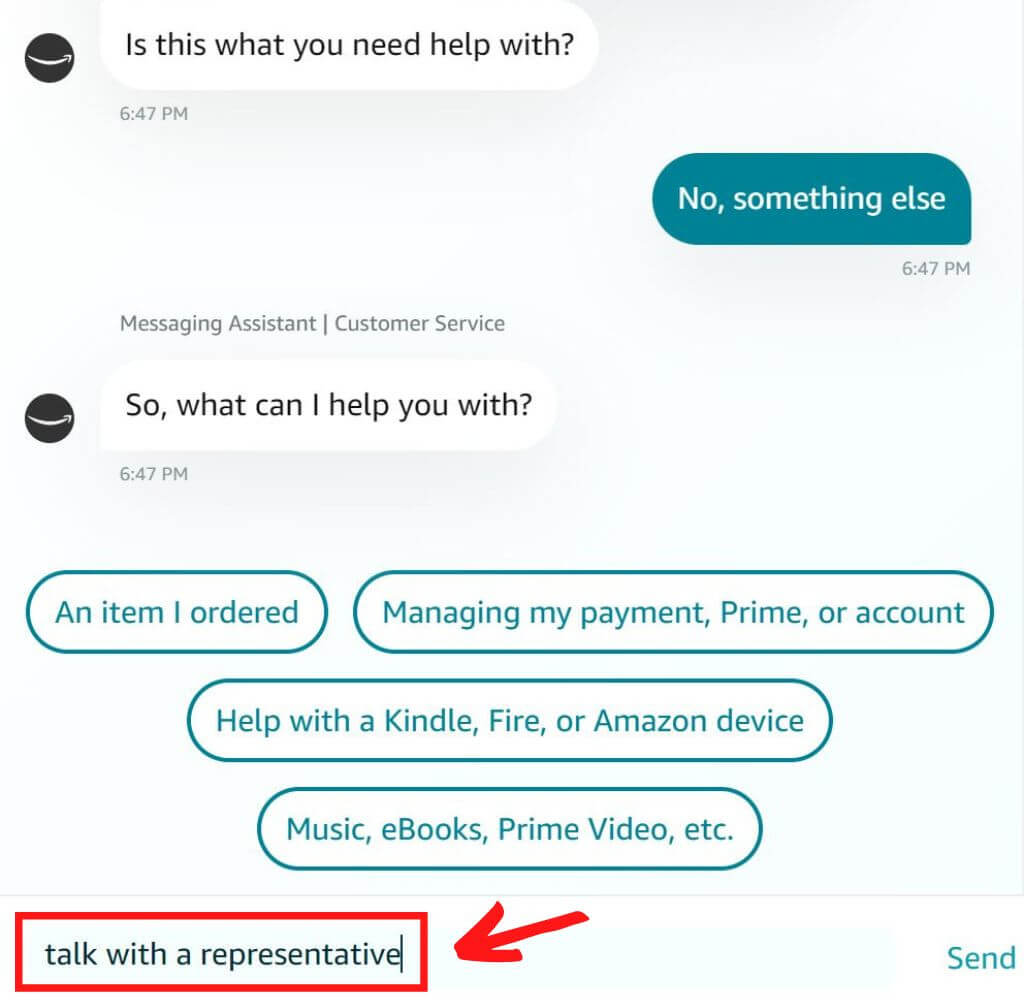
Next, you’ll be given several new options of buttons to click, but bypass all of those and instead type “talk with a representative” into the chat box. It can also work to just type “representative.”
7. Click “Chat with an associate now”
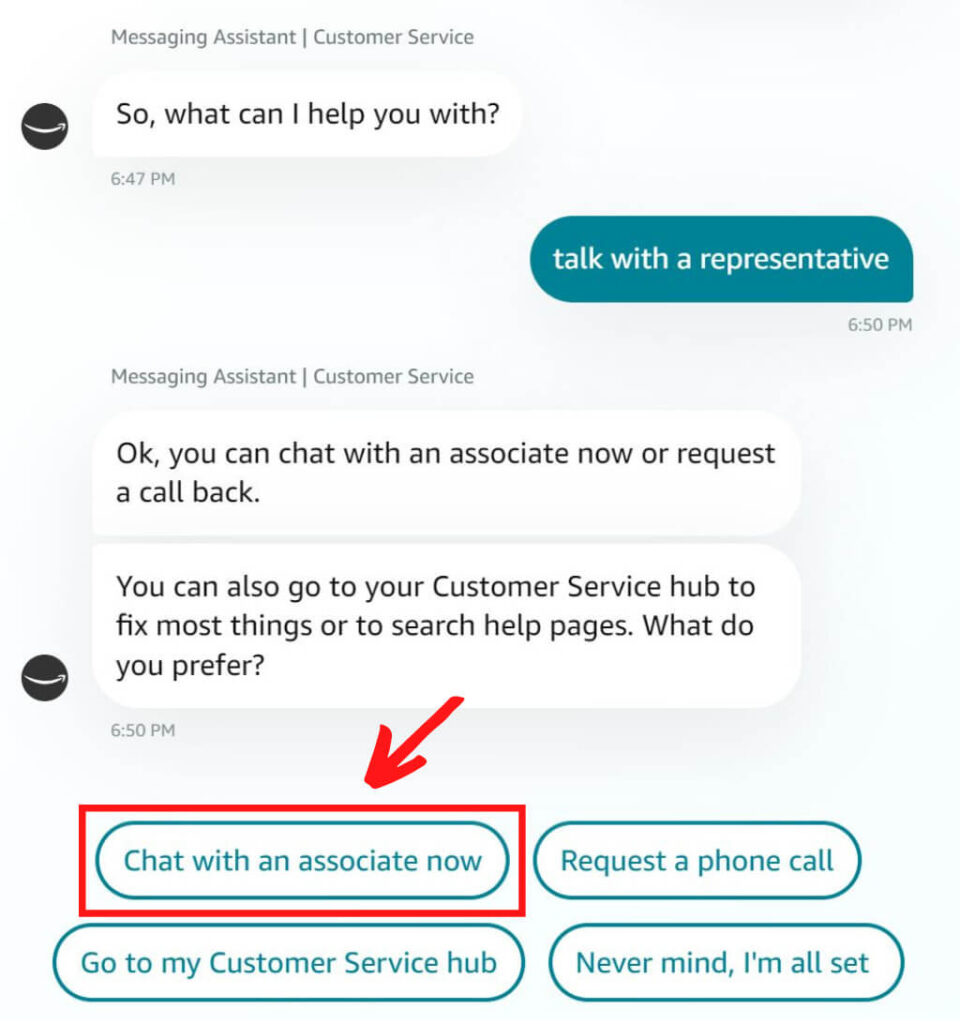
And lastly, click the button that pops up that reads “Chat with an associate now”.
Once you’ve reached this step and clicked the button, you’ll be connected with a live Amazon associate (aka customer service representative) and can type your question or what you need help with into the chat box.
If it felt like a journey to get here and you’re exhausted, then…well, same. Me too. Amazon has been making it more difficult to get to talk to an actual real, live customer service representative. But if you follow these steps then you’ll get to chat with a representative as easy as 1, 2, 3…uh, 4, 5, 6, 7! 😉

How to Contact Amazon Customer Service Chat by App
If you’d prefer to contact customer service using chat but on the Amazon app instead of the website, then the steps are pretty similar but still a little different. So here is the step-by-step guide for reaching Amazon customer service contacts through the app!
1. Open the Amazon App and Tap the Profile Icon
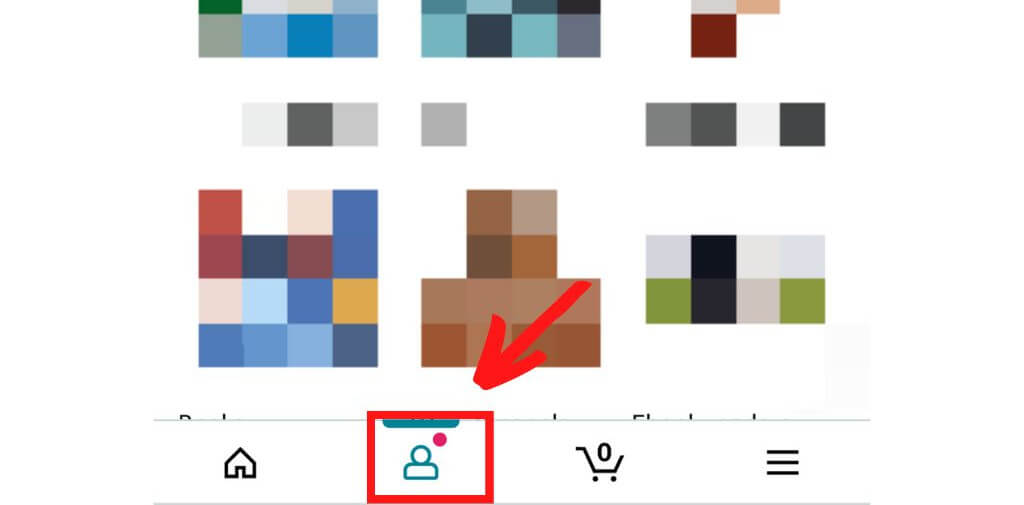
Your first step when contacting Amazon Customer Service via the app is to open the app and tap the profile icon at the bottom.
2. Click the “Your Account” Button
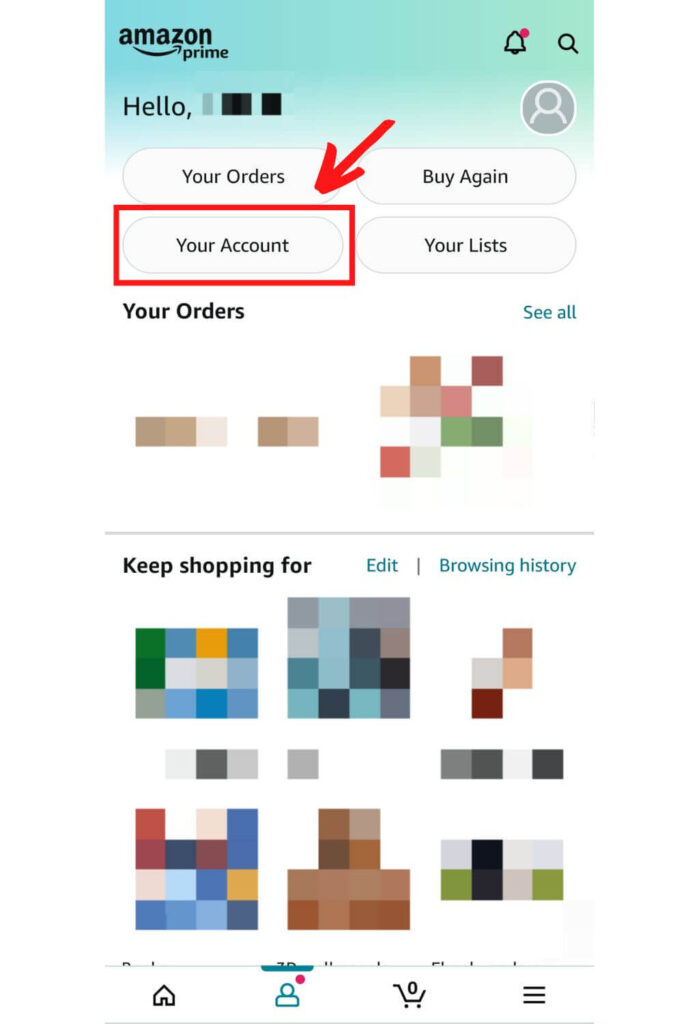
Next, click the “Your account” button on the upper left side.
3. Click “Contact Us”
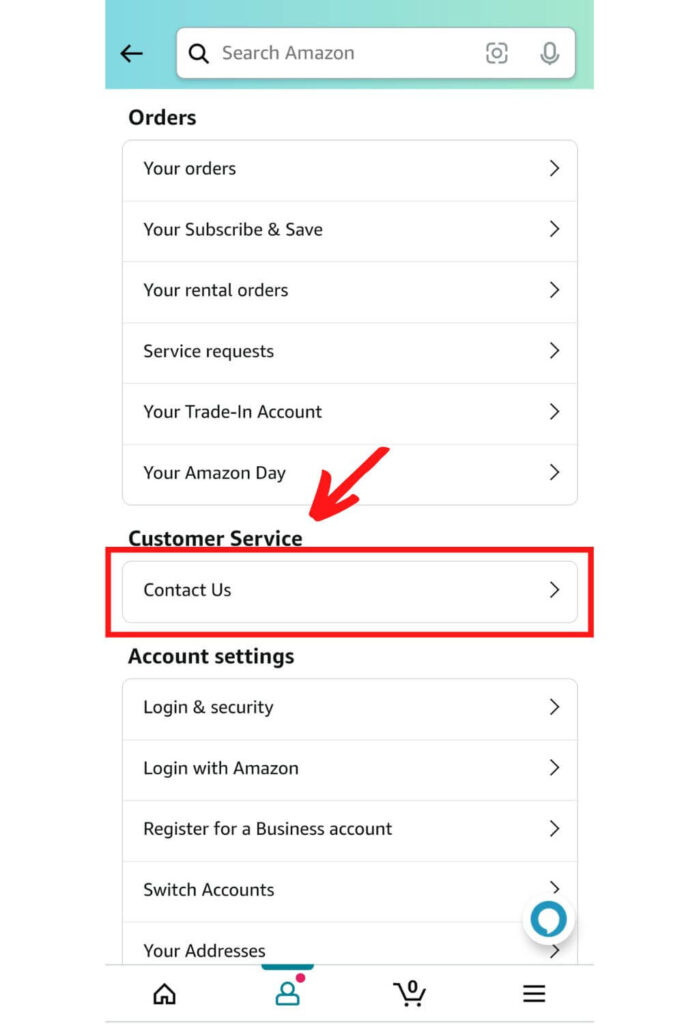
After that, click the “Contact us” option under the “Customer service” section.
4. Click “Get help with something else”
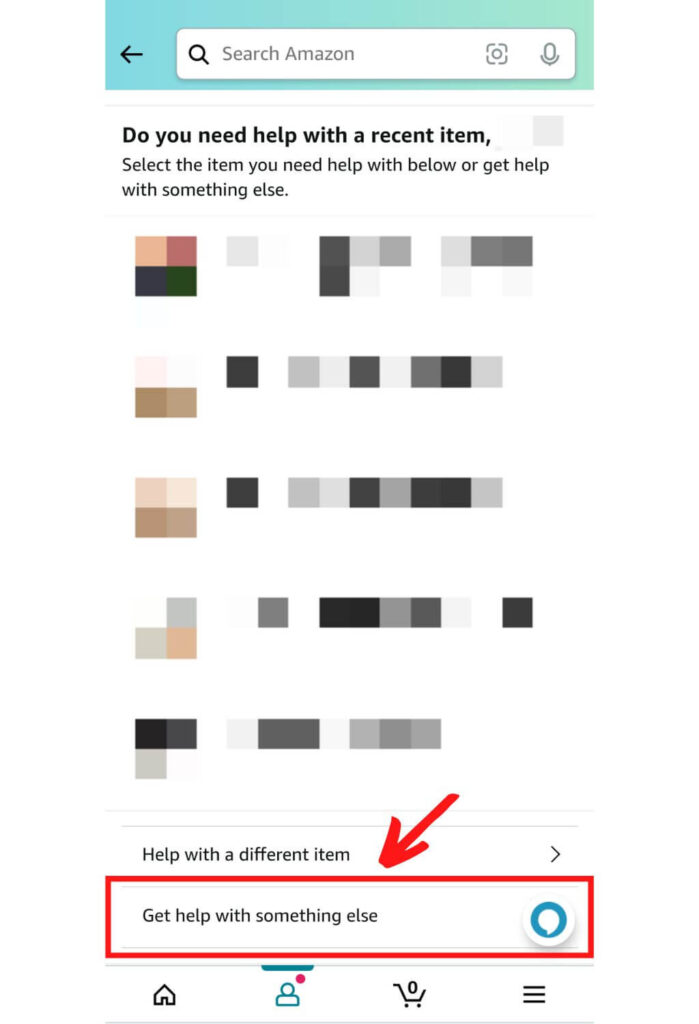
Then, scroll to the bottom and click the “Get help with something else” button.
5. Click “Something Else”
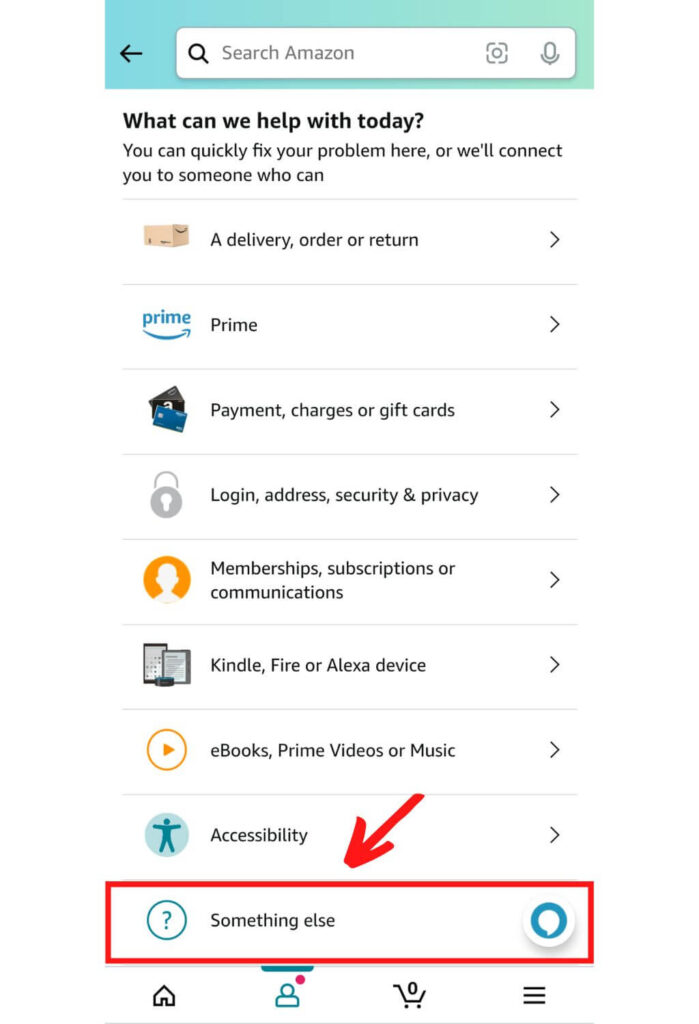
Scroll down once again and click the “Something else” option. (I know, I know, it’s a lot of steps!)
6. Click “I Need More Help”
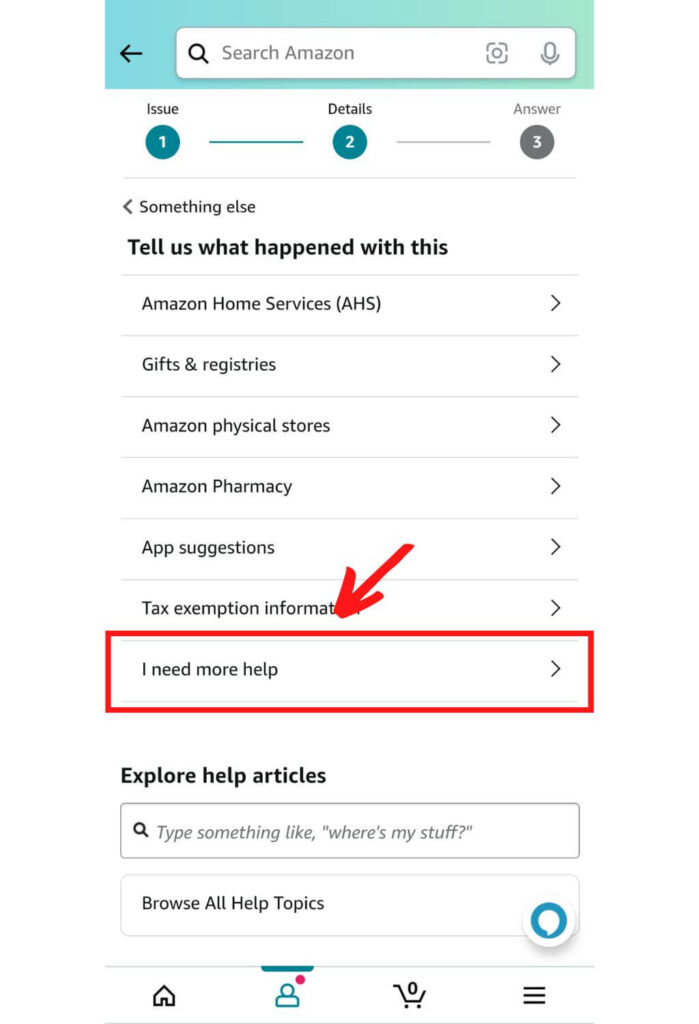
Then, click the “I need more help” button. This will open up the Amazon chat window.
7. Click “No, Something Else”
Now that you’re finally in the chat dialog, you’ll need to tap the “No, something else” button that pops up when the bot asks you what you need help with.
8. Type “Talk With a Representative”
Then you’ll be given several new options of buttons to click, but bypass all of those and instead type “talk with a representative” into the chat box. It can also work to just type “representative.”
9. Click “Chat with an associate now”
And lastly, click the button that pops up that reads “Chat with an associate now”.
Once you’ve reached this step and clicked the “Chat with an associate now” button, you’ll be connected with a live Amazon customer service representative and can type your question or type what you need help with into the chat box and they should be able to help you!
What a journey! Pat yourself on the back for making it through all those steps.

How to Contact Amazon Customer Service by Phone
Does Amazon have 24/7 customer service call lines? Yes, they do! And this can be one of the easier and better methods of contacting Amazon.
While Amazon prefers to point you to its customer service hub online first, giving them a call can be a good way to clear up any issues or problems in a more timely manner.
To talk with a live Amazon representative by phone, you can call their general service number at 1-866-216-1072 if you are in the US or Canada.
If you’d like an Amazon customer service number for outside of the US and Canada, then the international Amazon phone number you should call is 1-206-266-2992.
If you want to call Amazon customer service, keep in mind that before you get to a live person you will first have to speak with an automated system. They ask you to help verify which Amazon account you are calling about, and have you work through a few steps before you are allowed to speak with a representative.
You do get to speak with a live person eventually, but keep in mind that just like with chat there are a few preliminary steps you’ll have to take before you get there.
The Amazon contact numbers above are personally verified by me through checking with Amazon, as of the time of writing this article. The general Amazon 24/7 customer service phone number for Amazon used to be 1-888-280-4331, but the numbers listed above are the most accurate and up to date.
How to Contact Amazon Customer Service by Email
Amazon customer service email is also a possibility for how to contact someone at Amazon customer service, though in general this is less reliable than other methods for contacting representatives.
If you still wish to give it a try, you can send an email to [email protected]. Email response times vary but are usually at least 24-36 hours after you send your email, so keep in mind that this is not a good option for contacting customer service if your issue is time sensitive.
How to Contact Amazon Customer Service by Social Media
Can you contact Amazon customer service by social media? Yes, you can! In fact, they even have a few social media accounts specifically meant for answering customer service questions.
Here are your best options for contacting Amazon customer service on social media:
Most modern companies especially tech giants like Amazon are definitely present on social media through various platforms.
Here’s how you can leverage Amazon help through their social media channels –
- Twitter – www.twitter.com/amazonhelp
- Facebook – www.facebook.com/AmazonHelp/
- Instagram – www.instagram.com/amazon
How to Contact Amazon Customer Service FAQ
Still have questions about contacting Amazon customer service? Here are a few more frequently asked questions! If you don’t see the answer to your question here, feel free to leave a comment below!
1. How do I contact Amazon customer support?
There are four ways to contact Amazon customer support. You can contact them by chat, phone, email, or social media. See the detailed instructions above for step-by-step guides to contact Amazon with each of these methods!
2. How do I talk to a representative at Amazon?
If you want to talk in real-time to a live representative at Amazon, your options are to contact them by live chat or phone. See the step-by-step guides above to learn how to do this!
3. What is Amazon’s 1-800 number for customer service?
Amazon’s 1-800 number for customer service in the US and Canada is 1-866-216-1072, and for international numbers you can call 1-206-266-2992.
4. Can I email Amazon customer service?
Yes, you can email customer service, but this is the least reliable Amazon customer service contact method so it is recommended you try live chat or calling instead.
5. Why can’t I contact Amazon customer service?
Contacting Amazon customer service can be a frustrating and somewhat complicated endeavor at times. If you haven’t been able to contact Amazon customer service, then try one of the step-by-step methods outlined above.
Sometimes it is simply tricky to find the right buttons and follow the trail to get to Amazon’s customer service options, because they have lots of self-help resources they’re hoping you use before talking with a customer service agent. But if you follow the guides outlined above, you should be able to get through to an Amazon representative anytime you need to talk with one!