
Wondering how to gift an Audible book to someone? Audible offers so many excellent audiobooks to enjoy, so if you know someone who likes listening to audiobooks then giving an Audible book as a gift is a great idea. And if you’re wondering how to gift Audible books, then read on to learn exactly what you need to do!
Want to know whether Audible is worth it? Check out my honest review to learn if I think it is worth the cost!
How to Give an Audible Book as a Gift
When you’re wondering how to give an Audible book as a gift, it can be a bit complicated to figure out if you’ve never done it before. But with the step by step guide below, you’ll have the Audible book gift purchased in no time!
1. Choose the Audible Book You Want to Give
Your first step is to decide which Audible book you are interested in giving. You can easily browse all the Audible book options on Amazon.com, or you can log into your Audible account and browse there.
Once you’ve decided what book you want to give as a gift, log into your Audible account and open the listing for the title you decided on. For the purposes of showing you the process for giving an Audible book as a gift, I’ll be using Pride and Prejudice as an example.
2. Click “More Options” From the Audible Listing
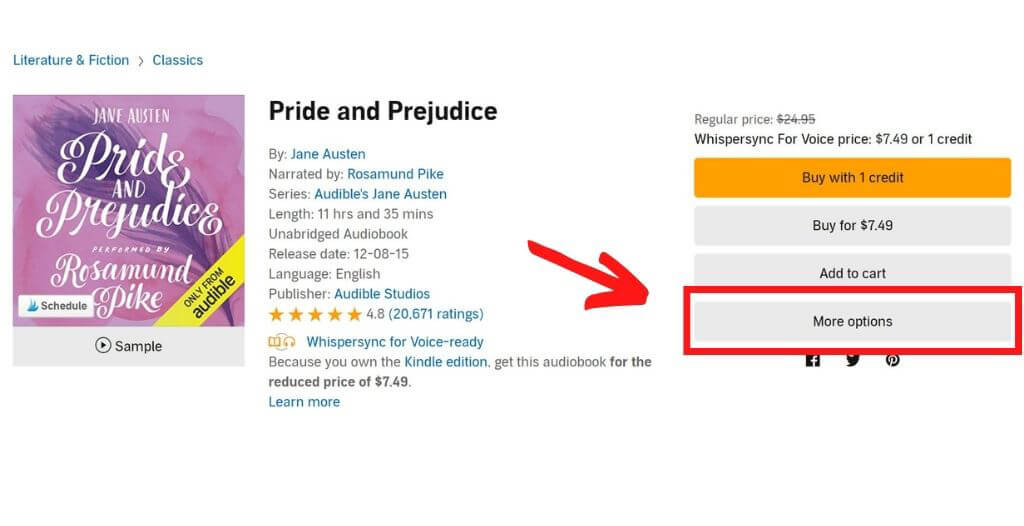
Once you have your chosen Audible title’s listing up on Audible.com, click the “More options” button. (This step is for desktop users only. If you are shopping for an Audible book as a gift on mobile, skip to the next step).
3. Click “Give as a Gift”
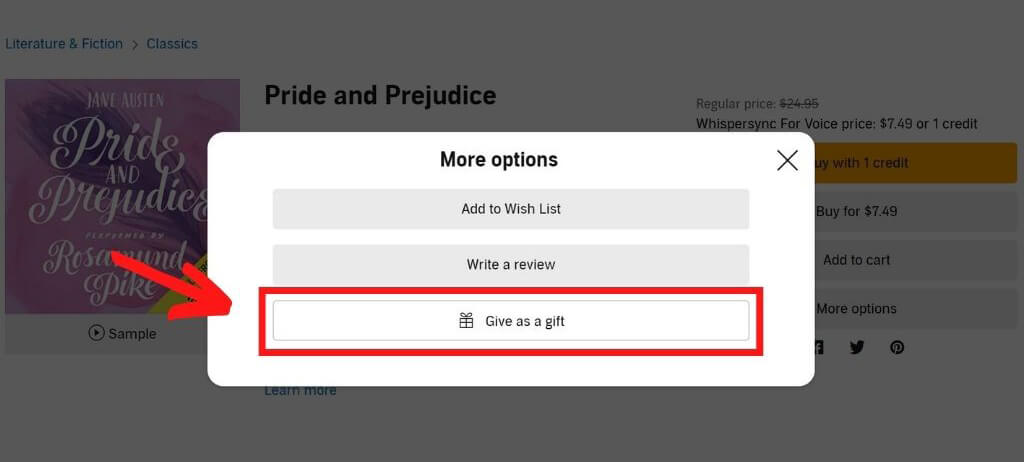
After you click “More options,” a pop-up will appear with a few extra options. Click the bottom button with the words “Give as a gift.”
4. Fill in the Recipient’s Details and Add a Gift Message
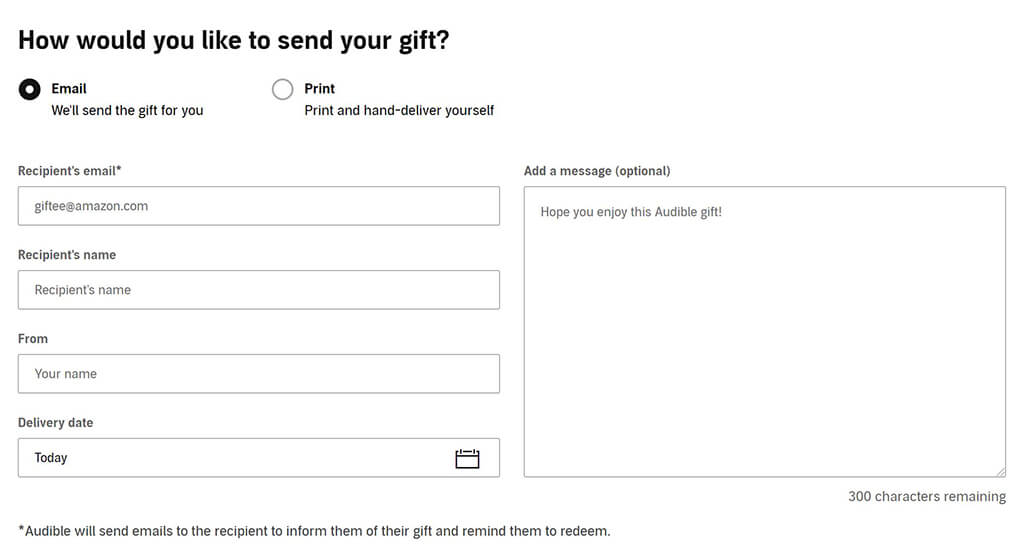
When you click the “Give as a gift” button, you’ll be taken to a new page with a form where you can fill in the recipient’s details. At this step, you can choose between sending your gift in an email or printing and delivering it yourself.
From this page, you can also choose a delivery date if you’re delivering by email (anytime within a year from the date of purchase) and add a short personalized gift message that will be sent to the recipient with the link to redeem their Audible book gift. Once you have filled out the form, click “Continue.”
5. Preview Your Audible Book Gift
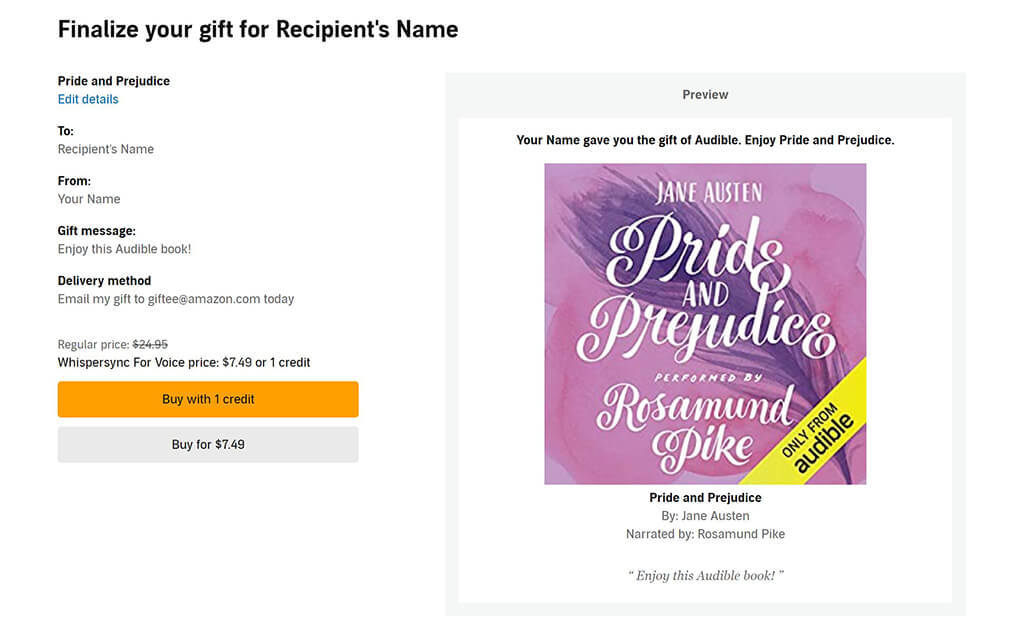
The next step in giving an Audible gift book is to preview your order. On this page, you can proofread all the information you submitted as well as seeing a sneak peek (on the right) of what will be sent to the recipient.
6. Click to Purchase Your Audible Book Gift
If everything looks good on the preview, then on this same page you can choose whether you want to purchase with an Audible credit or buy the book using your credit card. Once you’ve chosen, confirm your purchase and you’ll be taken to a Thank You page letting you know your purchase was successful.
If you chose to print your gift instead of emailing, you’ll receive instructions at this point on how to print and fold the card. And that’s it—you’ve learned how to gift a book on Audible!
Other Audiobook/Book Gifting Options
If you don’t have an Audible account, don’t know which book title to give, or for any other reason don’t think an Audible book is the right choice of gift for your recipient, then there are a few other options you should consider:
- Audible Membership – Gifting an Audible membership may be a better choice, especially if you don’t know what book to choose. You can gift a 1, 3, 6, or 12 month subscription, which allows the recipient to choose their own books to listen to!
- Gift a Kindle Book – If the recipient likes reading, then giving a Kindle book might be something they would enjoy. Gifting a Kindle ebook is easier than gifting an Audible book, and you can learn how to gift a Kindle book here.
- Kindle Unlimited – Another great option is giving Kindle Unlimited, which allows the recipient to borrow and read an unlimited number of books from the Kindle Unlimited library throughout the duration of their subscription. This is a fun way to gift them lots of books that they may enjoy! Learn how to gift Kindle Unlimited here.
- Amazon Kindle Gift Card – If all else fails, a Kindle gift card is an excellent choice. This gift card features the Kindle logo and the recipient can use it to purchase Kindle books they want to read or anything else on Amazon. (However, gift cards are not eligible to use on Audible memberships and Audible books).
Audible Book Gift FAQ
Still have questions relating to how to gift books on Audible? Here are a few frequently asked questions. If you don’t see your question answered here, feel free to ask it in the comments!
1. Can I use a gift card to buy an Audible book as a gift?
No, unfortunately not. Amazon does not make Audible-specific gift cards anymore, and regular gift cards cannot be used to purchase Audible books or Audible memberships.
2. Can I use a coupon when purchasing an Audible book as a gift?
No, coupons cannot be used on the purchase of a gift title. You can use Audible coupons when purchasing titles for yourself, just not when you buy an Audible book as a gift.
3. What happens if I send someone a title they already own?
If you’re concerned about gifting someone an Audible title that they already own, don’t be worried! If the recipient already has the title in their Audible library, they can exchange the title for a credit or coupon that they can use on a different book that is not in their library.
That “more options” button does not seem to exist. Did they change their terms of use or something?
Hi Rob! I just checked, and I am still seeing the “more options” button on both desktop and mobile…so I’m not sure why it isn’t showing up for you. One possibility is that perhaps you are looking on Amazon.com instead of on Audible.com? If you’ve double checked that you are looking at the audiobook listing on Audible.com and you still don’t see the “more options” button, then I recommend reaching out to customer service to see if they can help you buy the audiobook you want to buy as a gift.
Rob, That option does not show on the app. Use a web browser, mobile or PC and that should do the trick.
Thanks for sharing, Eddy – that’s good to know!
Abi; thank-you very much for these instructions. It worked perfectly!
Yay! I’m so happy to hear it worked perfectly for you!
Thanks for all the step by step screenshots — very helpful!
You’re welcome! I’m so happy it was helpful for you!