
Wondering how to pause Audible membership? Pausing your membership can be a great way to keep some of your Audible membership benefits without being charged each month, so if you’re wondering how to pause your Audible account or what pausing your account even means, then this is the guide for you!
Can You Pause Audible Memberships?
If your Audible credits are building up, you might be wondering: can you pause Audible subscriptions? And the answer is yes! It’s a fairly easy canceling process to, so read on for the step-by-step guide to pausing Audible.
Audible Pause vs Cancel: Which is Better?
What is the difference between Audible pause and Audible cancel? These two can seem a little bit similar, so here’s what you need to know.
Pausing your Audible account means you can suspend payment and suspend your account for up to 3 months (but you can only do this once in a 12 month period). During this time, you will not receive any new credits and you will not be able to access the Audible Plus Catalog. However, you can still use any accumulated unused credits and can buy audiobooks during any specials or sales. You can also buy Audiobooks from the Daily Deal.
Canceling your Audible account means you lose access to all Audible membership benefits, and you won’t be charged for the subscription again at any time (unless you choose to restart your membership). It also means you will lose any unused credits at the time of cancellation. Besides losing access to Audible sales and the Daily Deal, this is the biggest difference between pausing and canceling Audible. So if you decide to cancel, be sure you have bought Audiobooks with all your unused credits so you don’t lose out on the audiobooks you’ve already paid for by being an Audible member!
What to Know Before You Pause Your Audible Membership
If you’re considering pausing your Audible subscription, there are a few things you need to know before you do so:
- You can pause your membership for up to 3 months. You can choose whether you want to pause for 1, 2, or 3 months. You can choose to resume at any time even before the end of your pause, but you can’t choose to extend your pause. If you are unsure how long to pause for, I recommend going for 3 months and then resuming early if you want.
- You can only pause your membership once every 12 months. Pausing your account can only be done once in a 12 month period, and is measured from the date of the end of your pause (the resumed bill date). For example, if you pause your account and it resumes on December 12th, you cannot pause your membership again until December 12th of the following year.
- Pausing is not canceling, so if you want to cancel your membership after your pause then be sure to set a reminder to help you remember to cancel! If you don’t cancel in time, you will be charged for the next month.
Now that you know a few important facts about this process, it’s time to learn how to pause your Audible account!
How to Pause Audible Subscription
If you’ve accumulated a lot of unused credits or just haven’t had time to listen to all the audiobooks you’ve exchanged credits for on Audible, then it’s likely a good time to pause your membership. Here are the instructions to pause Audible memberships:
1. To start the pausing process, you first need to visit Audible’s Contact Us page.
2. Once you’re on the page, click the button that says “Membership.”
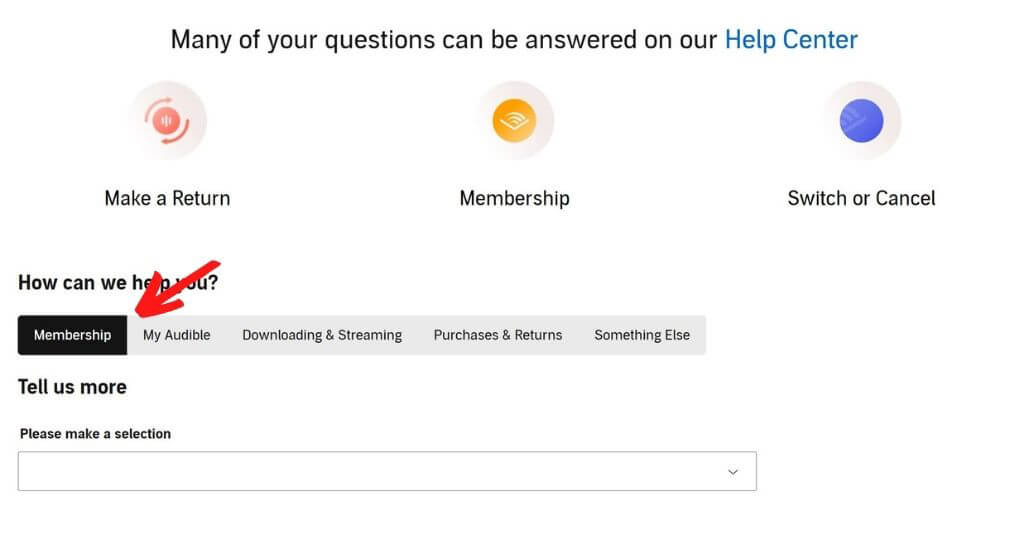
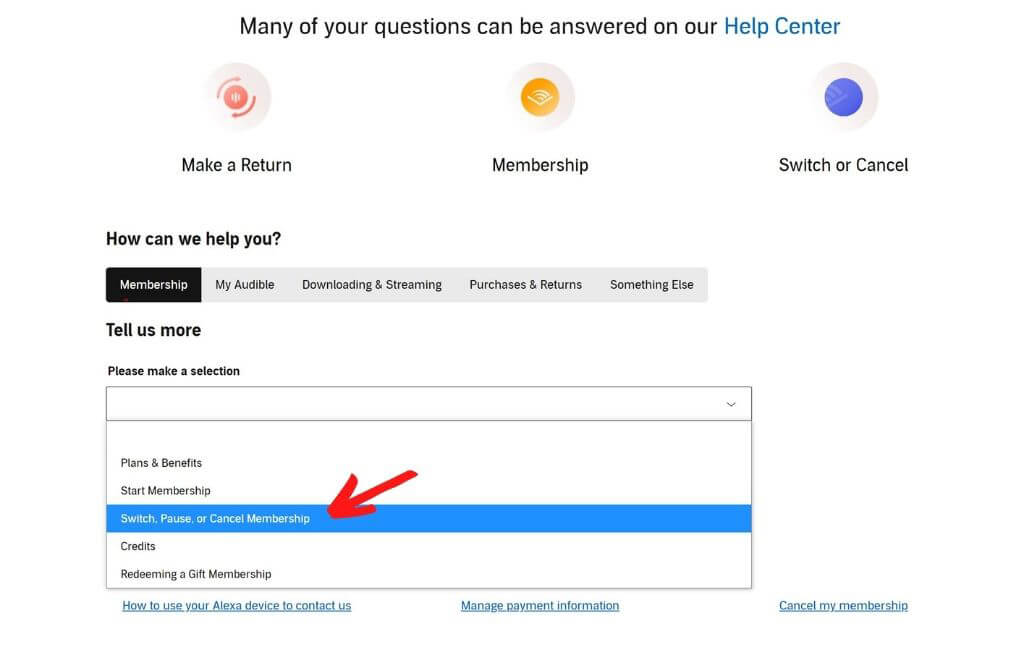
3. Next, you need to choose a selection to tell Audible what you need help with. Choose the option that reads “Switch, Pause, or Cancel Membership.”
4. Once you enter your selection, the Audible contact options will pop up. These are three orange buttons that read “Chat,” “Phone,” and “Email.” Choose which method you would like to use to pause your Audible membership.
- Chat: If you choose to contact by chat, simply click the “Chat” button and then type a short message (saying you want to pause your membership) into the box that pops up. An Audible representative will then pause your membership for you.
- Phone: If you wish to pause your membership by phone, click the “Phone” button. You will then need to type in your country and phone number so that an Audible representative can call you to help you pause your membership. From this page, you can also see estimated wait times and choose whether to have them call you now or in five minutes.
- Email: If you want to pause your membership by email, click the “Email” button and then a pop-up will appear where you can type in a subject line and a short message saying you would like to put your Audible membership on hold. A representative will pause your membership and let you know as soon as they can.
When I paused my membership, I found chat to be the easiest way. I was done in about 2 minutes! The representative just asked me if I was sure I wanted to pause, and then reviewed the rules for pausing (as mentioned earlier—that you can’t pause again for 12 months and that you can’t use the Plus Catalog during your pause).
5. The final step is to check your email to see your pause confirmation. Audible will send you an email that says when your membership will resume, so if you don’t want to be charged again you will need to make sure to cancel before that date. And you’re done—that’s how to pause Audible accounts!
Pausing Audible Membership FAQ
Still have questions about pausing your Audible subscription? Here are answers to some frequently asked questions. If you have any other questions, feel free to leave them in the comments!
1. Can you pause Audible and keep credits in your account?
Yes! Unlike canceling your Audible membership, placing your membership on pause allows you to keep your credits. So if you’re feeling overwhelmed with the number of credits you have received or just don’t have time to use Audible right now, you can definitely pause Audible without losing credits.
2. Can I use my unused credits while my Audible membership is paused?
Yes, you can use your available credits while paused! Even when your membership is on hold, you can exchange any unused credits for audiobooks if you find an audiobook you would like.
3. Why should I pause Audible instead of cancel?
If you’re asking “How do I pause my Audible membership?” but also wondering why you should pause instead of cancel, there are quite a few reasons it might be a better choice. These reasons include that you won’t lose any unused credits when you pause, you can still use your credits and buy audiobooks while on pause, and you can still take advantage of sales and Daily Deals even when your account is on hold.
And even if you plan to cancel in the end, it may still be a good idea to pause your account first. Why? Well, if you want to cancel but haven’t had time to use all your credits yet, then pausing allows you to have up to 3 months of time to decide what to use your credits on before you cancel (and you won’t be charged during that time).
But remember if you plan to place your account on pause and cancel at the end, you’ll need to be sure to cancel before your next payment date or you will automatically be charged again!
4. Can I pause Audible from the app?
If you’re wondering how to pause Audible membership in app, unfortunately you can’t. You’ll have to follow the steps outlined above by going to the Contact Us page on Audible and talking with a representative by chat, phone, or email.
5. What happens if I cancel my Audible Subscription while it is paused?
If you choose to cancel your membership while you are still on a pause, any unused days on your membership time will resume and you can use your plan until the end of your current billing period. A that time, your membership and all benefits will end and you will not be charged again.
6. What happens if I end my membership pause early?
If you find you want to restart your Audible membership before the end of your pause, you can definitely do that! Just reach out to customer support and they can help you restart your membership. Your plan will resume full benefits, and on your next billing date you will be charged for the next month.
7. Can I pause my membership if I’m on an annual plan?
If you have paid for a whole year of membership up front or if someone has gifted you an Audible membership for a year, then unfortunately you are not eligible to pause your account. Only plans that are bought month-to-month are eligible for placing on hold.
Have questions about pausing your Audible membership and need to talk with a live Amazon representative? This step-by-step guide will help you easily get in touch with Amazon customer service!